Delegates, Events, and the Observer Mindset in C#
When a thing happens in your program, who should care? The class that raised it probably shouldn’t be the one deciding. That’s the whole “observer” idea: producers announce, consumers decide. In C# we get this with delegates and events. Used well, you end up with looser coupling, fewer “God objects,” and code that’s easier to extend without open-heart surgery.
Let’s start at the metal: delegates.
Delegates: a method in a variable
A delegate is a type that describes a method signature. It’s not the method itself; it’s a slot that can point to any method with a compatible signature. You can pass one around like any other value.
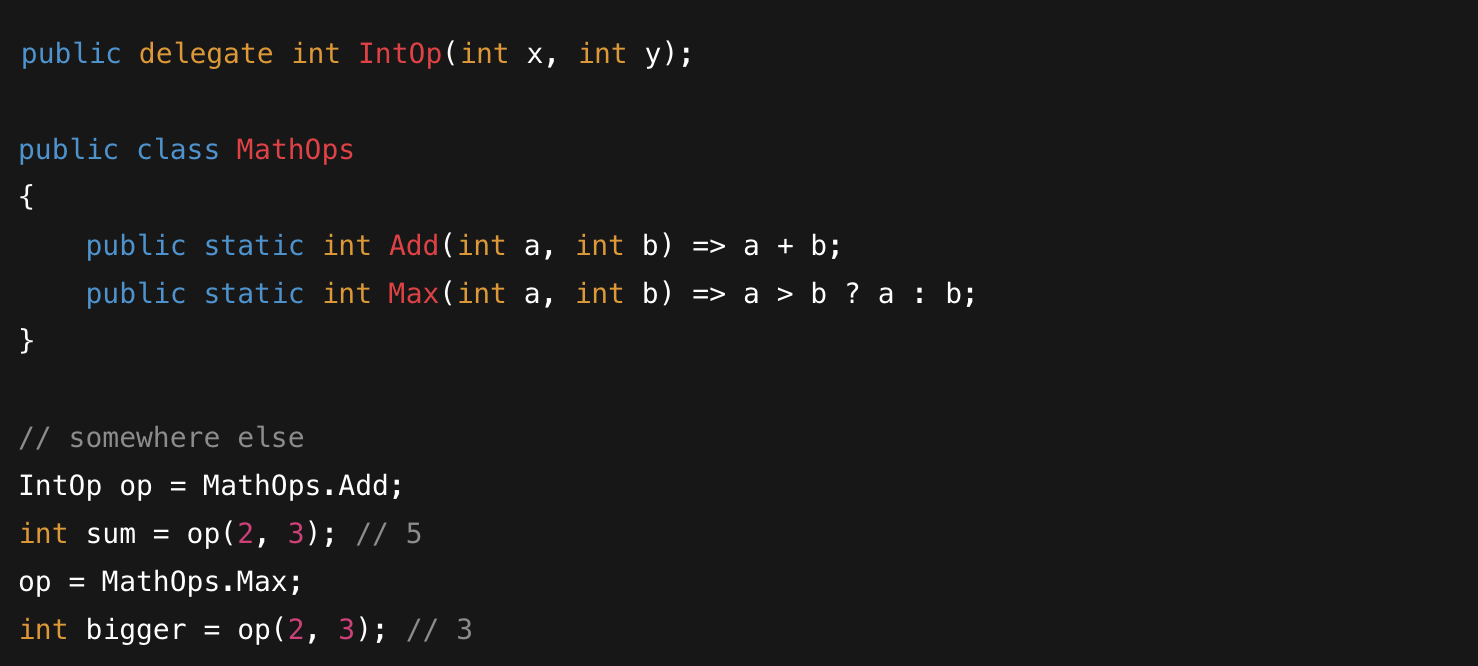
Note how the delegate “op” behaves differently depending upon which method is currently assigned to it
You almost never write custom delegate types today because Func<> and Action<> cover most cases. Func and Action are delegates built into the language for you. Still, it’s useful to know what you’re holding.

See that MathOps.Add above takes two integers as parameters and returns an integer. You probably know that Console.WriteLine takes a string and returns void.
With Func, the types are listed in order of the method signature, and then the final type is the return type of the method. With Action, you only need to list the method parameter types because Actions were designed to only apply to methods that return void (nothing). So you could think of Action as being exactly like Func except you don’t have to type “void” as the last type.
Delegates can be multicast, able to notify multiple subscribers. What you may not know is that a single delegate field can hold an invocation list. When you invoke it, every subscriber runs in order of subscription.

One caveat: if any subscriber throws, the call stops and the exception bubbles. We’ll handle that later.
Events: delegates with a safety rail
You could expose a public Action SomethingHappened; and let anyone assign anything. That’s flexible and dangerous. C# events wrap a delegate with add/remove accessors so outside code can only subscribe or unsubscribe, not overwrite your whole list.
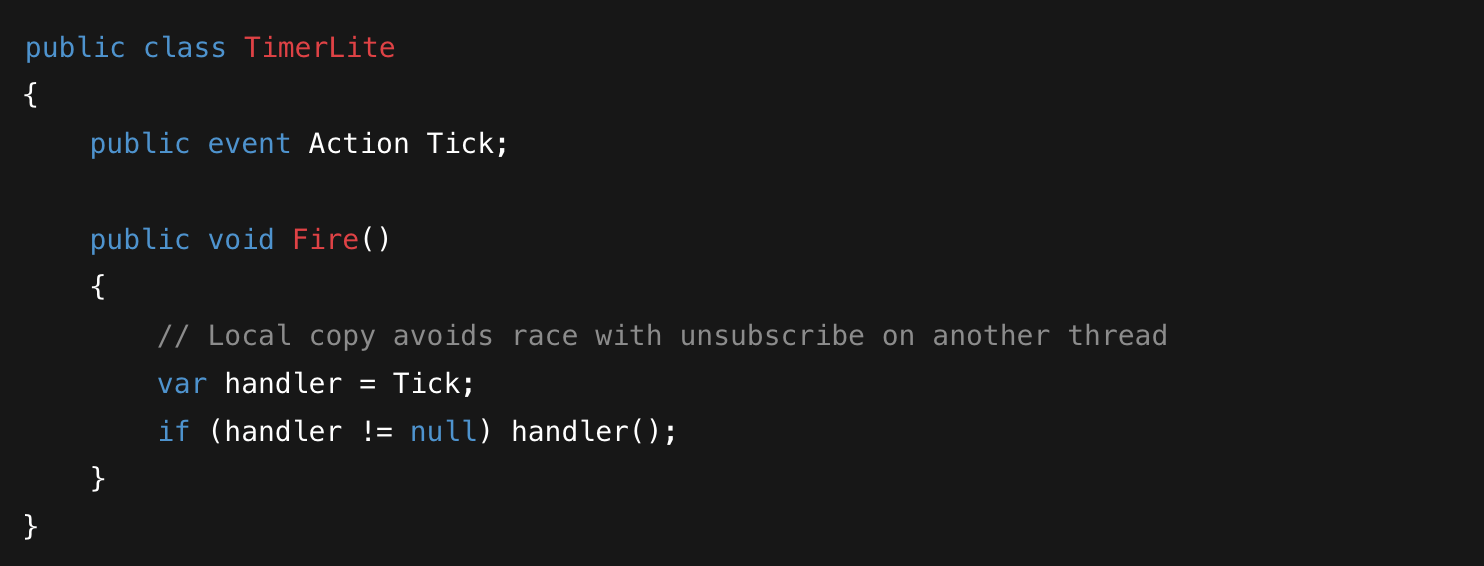
Users of your code can only subscribe or unsubscribe from the Tick notification- this is the protection we want.
EventHandler and EventArgs
The language also gives you a conventional pair: EventHandler and EventHandler<TEventArgs>. They standardize sender and payload so your API feels familiar. EventHandler is just a delegate type that .NET gives you so events all look and feel the same. A “delegate” defines a method signature. EventHandler says: “this event delivers two things: the sender (who raised it) and some data (event info that you can share with subscribers).”
There are two flavors:
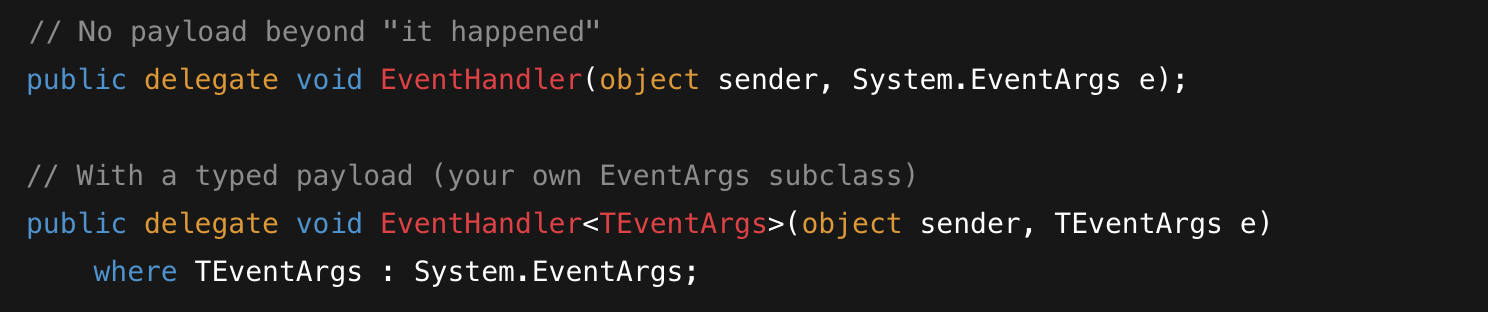
The top represents the case where we don’t need to pass any data with the event- just send the built in EventArgs from the System library to honor EventHandler’s unified method signature. We can use the bottom form when we want to pass data too, instead of just signaling that something happened. You override the EventArgs class to add whatever extra data you like.
That’s it. When you use these, every event in your API follows the same pattern:
senderis the object that raised the event (oftenthis). It lets listeners tell which instance fired without capturing references everywhere.eis an instance ofEventArgs(or yourEventArgssubclass) that carries any extra data about what happened.
Why use it instead of Action?
You could write public event Action<int> CoinsChanged;, but now the meaning of that int is ambiguous to a reader and you’ve lost the conventional sender/e shape that plays well with tooling and existing patterns. EventHandler makes your intent obvious and scales better when you add fields later.
A tiny example, end to end
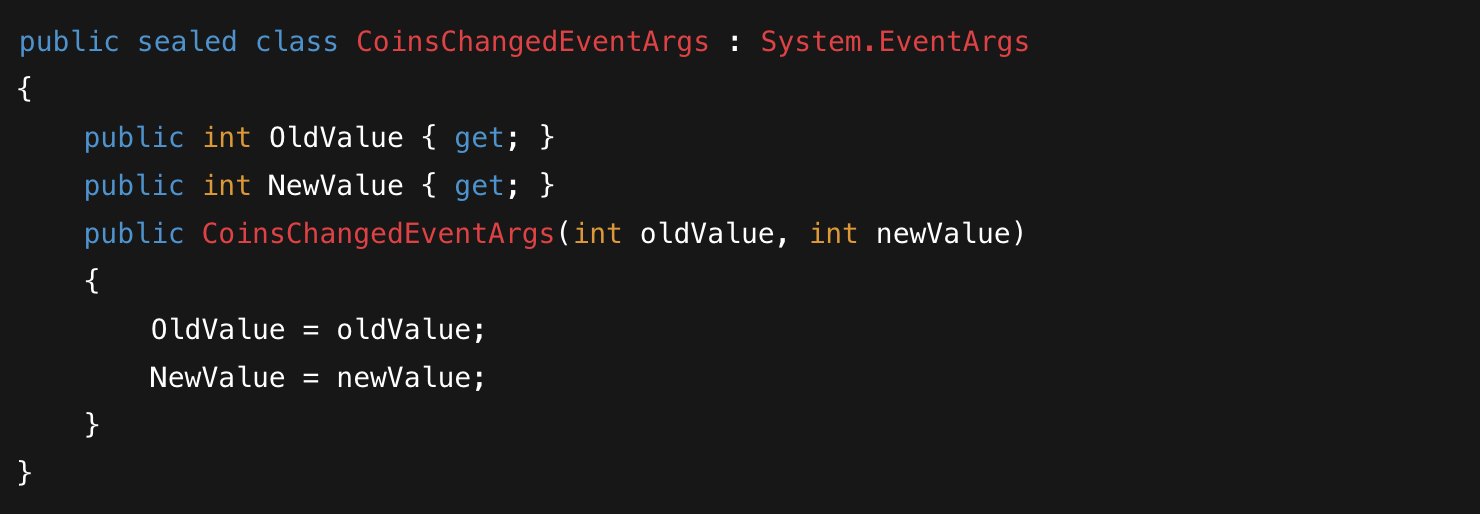
We override System’s EventArgs to provide the old and new coin amounts
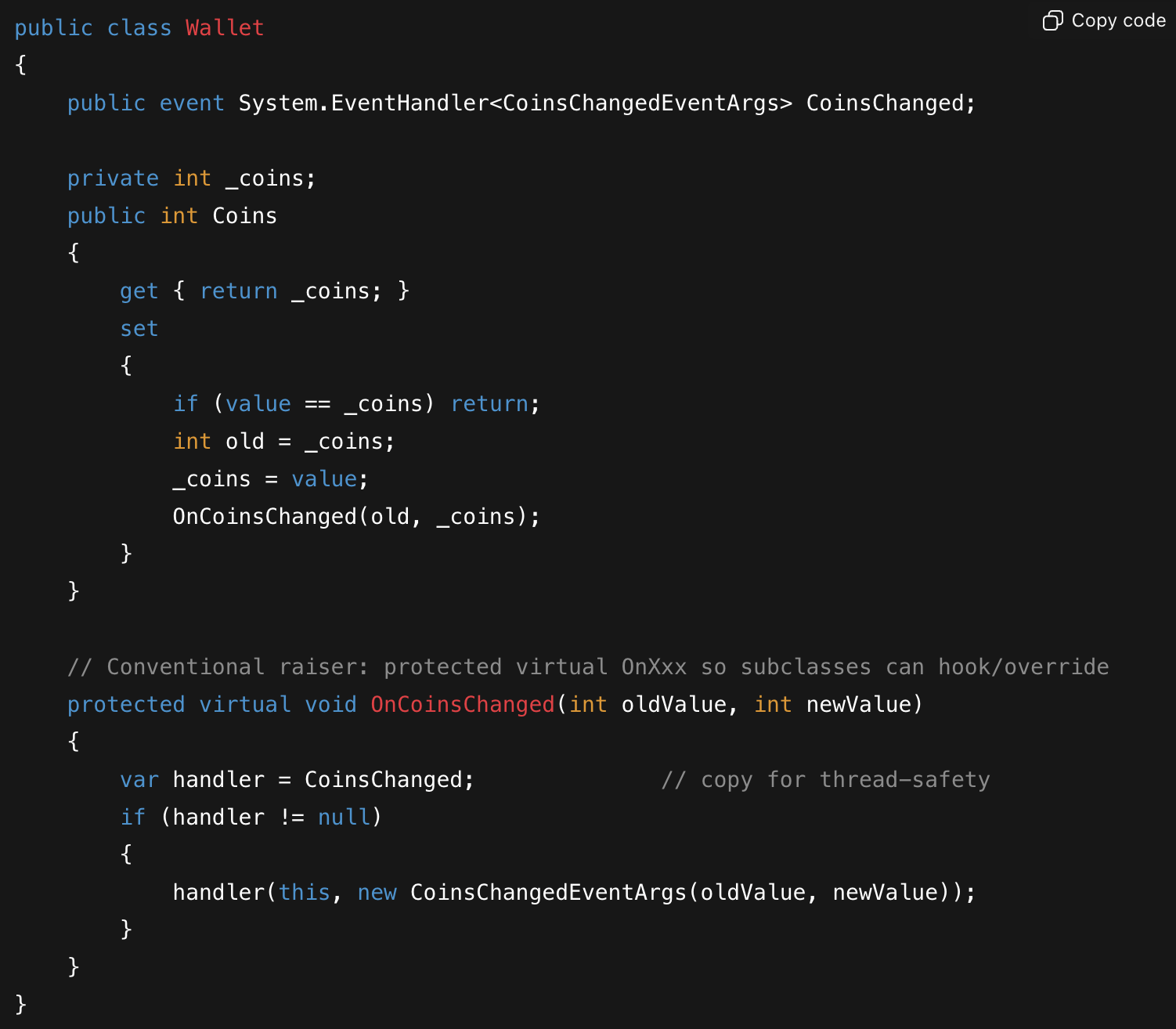
Our Wallet class can now use our custom event args to provider subscribers with the previous and current coin amounts, perhaps to set the roll up speed for a coin meter, initiate a big win sequence, etc.
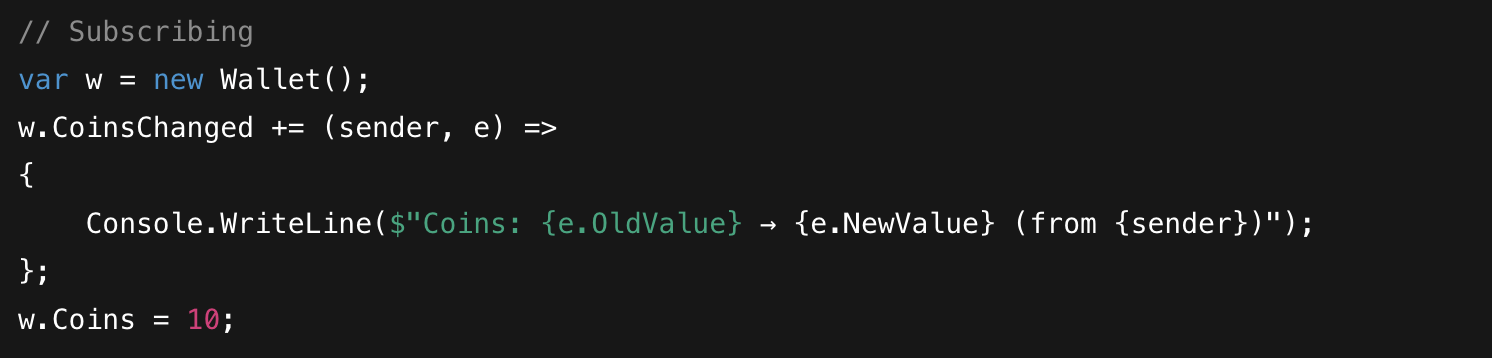
A trivial usage- display coin changes to the console, but maybe useful for debugging purposes
Common questions
Do I always need a custom
EventArgsclass? No. If the event has no extra data, use plainEventArgs.Emptywith non-genericEventHandler. If you do have data, prefer a small immutableEventArgssubclass so you can add fields later without breaking call sites:public event System.EventHandler Ticked; // no payload protected void OnTicked() { var h = Ticked; if (h != null) h(this, System.EventArgs.Empty); }Why is
sendertyped asobject? So the same handler method can listen to similar events from different types. If you need the concrete type, cast it in the handler.How do I unsubscribe? With
-=, typically in a “tear-down” orDispose/OnDisableso short-lived listeners don’t get kept alive by long-lived publishers:w.CoinsChanged -= handlerMethod;What if one subscriber throws? The invocation stops and the exception bubbles. If you want isolation, iterate the invocation list and
try/catcheach handler inside yourOnXxxmethod.
When to choose something else
Rule of thumb:
Use events for simple, in-process notifications.
Use IObservable<T> when you want to query a stream with operators (filter, transform, combine).
Use Channel<T> when you want a pipeline with producers/consumers, threads, and flow control.
If you need cross-process or durable messaging, you’ve outgrown all three—look at a message bus (e.g., RabbitMQ, Azure Service Bus, Kafka) and keep your C# interface thin on top.
A tiny, real observer: dice rolling
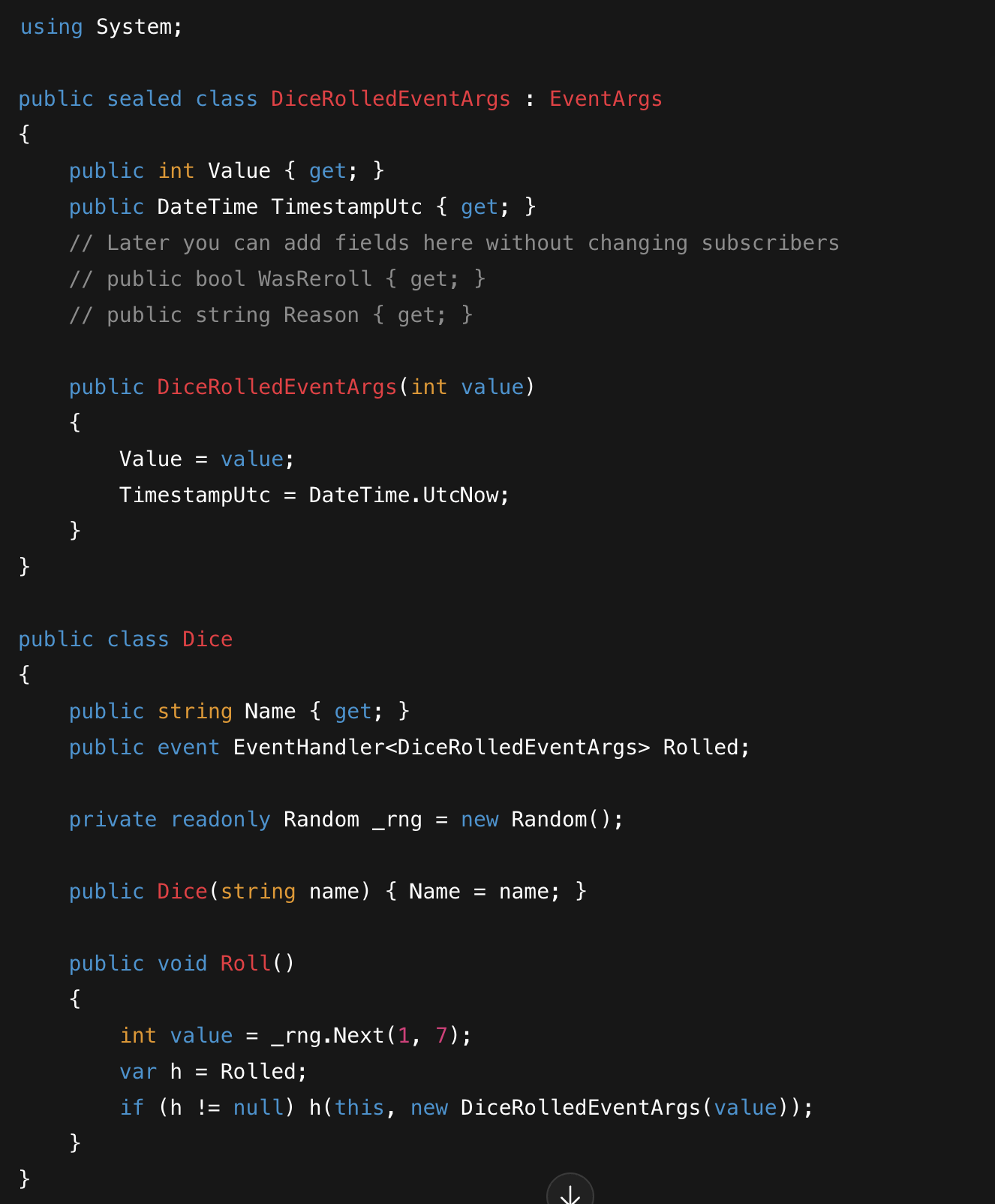
Fire the Rolled event after drawing a random value
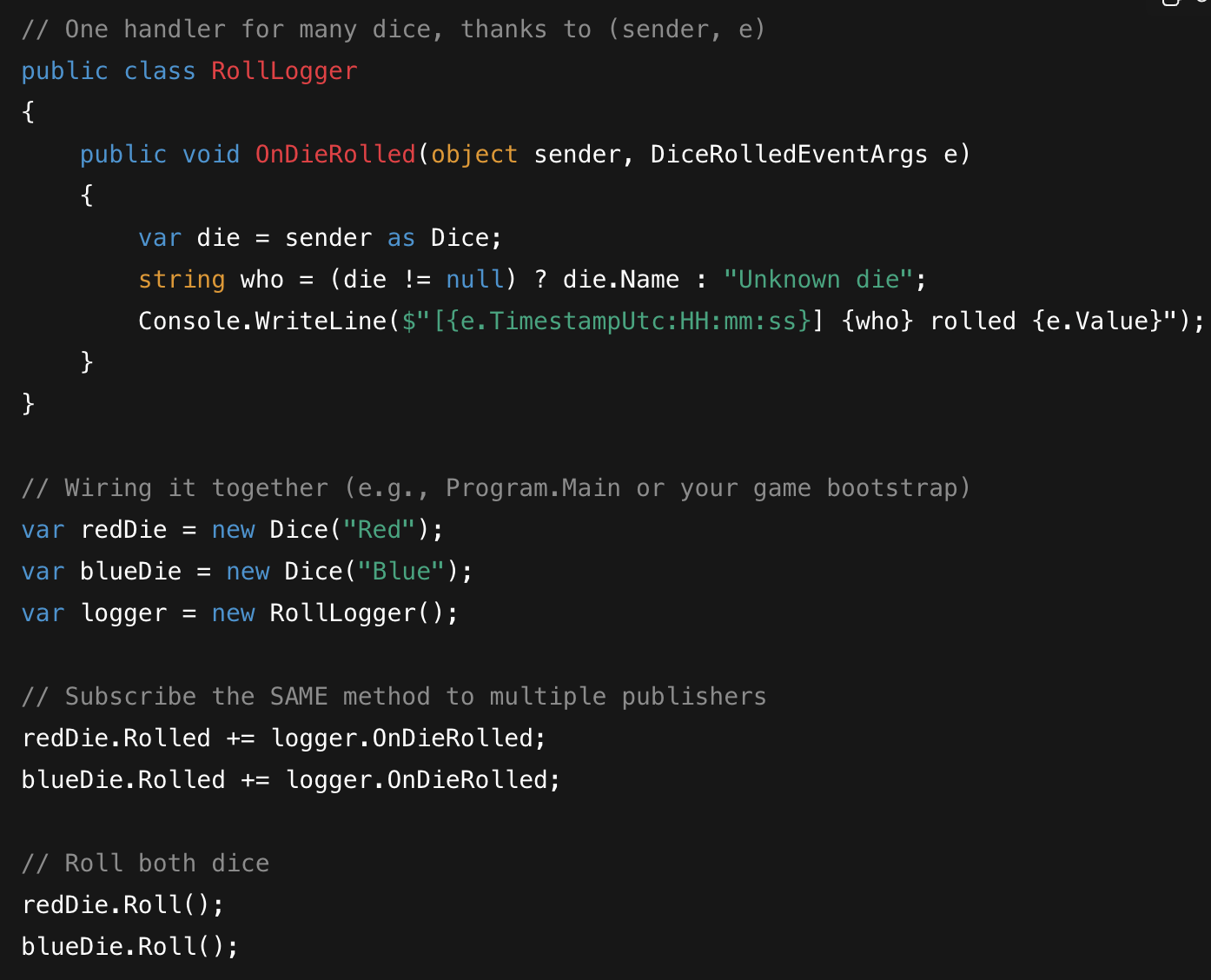
You can see the “sender” here is cast back to a Dice object locally, to access its public fields
We use EventHandler<DiceRolledEventArgs> so one listener can subscribe to many dice and still know who rolled, and we can extend the payload later without changing any handler signatures.
Unsubscribing matters (especially in long-lived apps)
If a short-lived object subscribes to a long-lived event and never unsubscribes, the publisher holds a reference to the subscriber and prevents it from being collected. In a long session you can leak lots of tiny listeners. Unsubscribe when you’re done, as in:
redDie.Rolled -= logger.OnDieRolled;
In UI frameworks, tie this to lifecycle events (e.g., subscribe on “shown,” unsubscribe on “hidden”). In Unity, subscribe in OnEnable and unsubscribe in OnDisable to match GameObject lifetime. For pure C#, use IDisposable to scope it.
Multicast delegates and exceptions
Remember that multicast behavior? If one subscriber throws, later subscribers don’t get called. Sometimes that’s fine. Sometimes it’s a nightmare. If you need isolation, iterate the invocation list yourself.
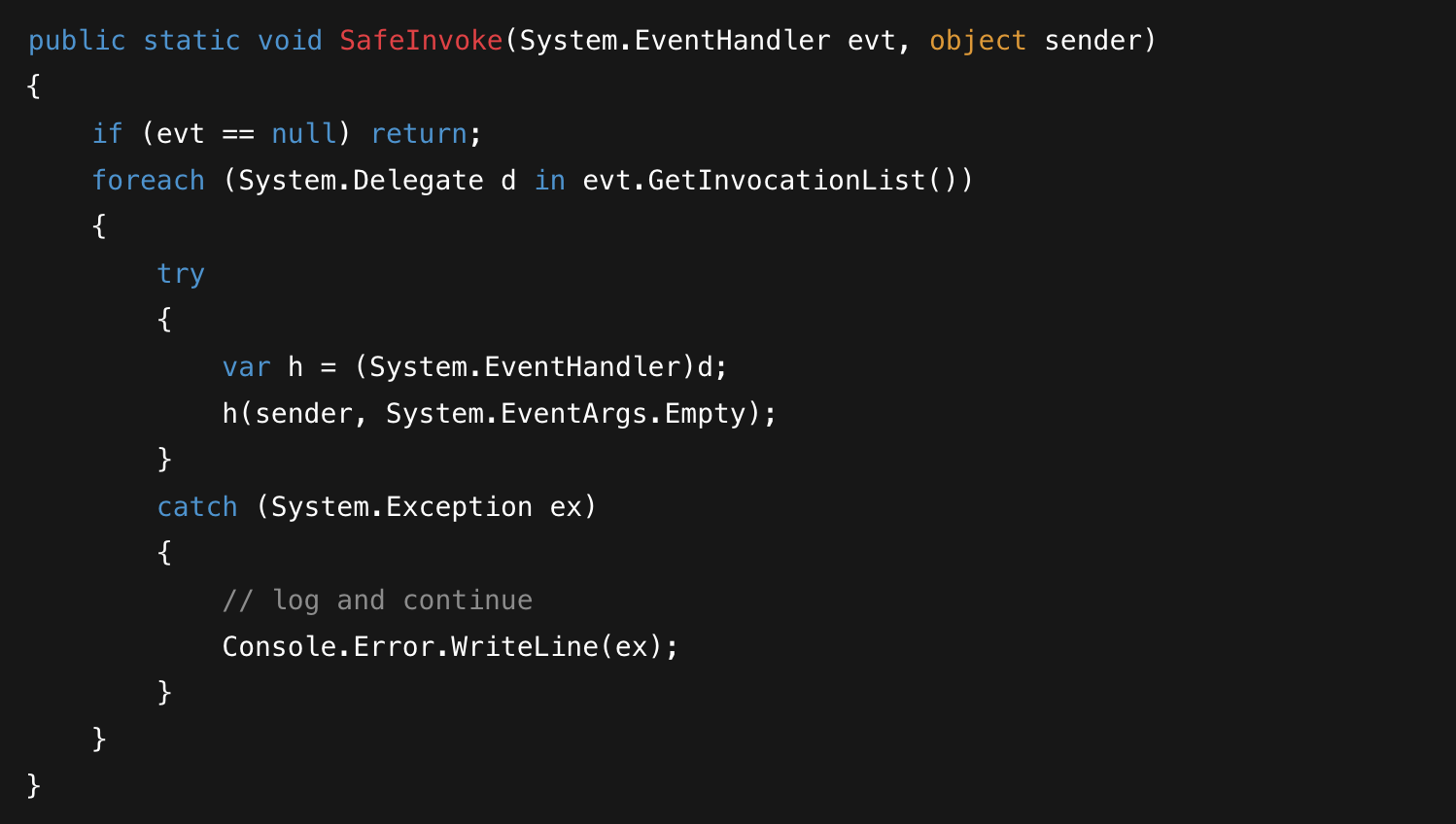
You can do the same with EventHandler<T> or Action
A quick checklist that keeps you out of trouble
Start with events, not raw public delegates, so consumers can’t overwrite your list. Prefer EventHandler and EventHandler<T> unless you have a compelling reason not to. Copy to a local before invoking when there are concerns with multiple threads. Be explicit about unsubscribe timing. Decide what happens if one subscriber throws and implement that on purpose. Don’t sneak business logic into your event raisers; keep them fire-and-forget and let the listeners do the work.
That’s the observer mindset in C#: producers announce, consumers decide, and you don’t wire everybody to everybody. It makes features easier to add, tests easier to write, and code a little more honest about who depends on whom.